

This article provides the latest and most complete tutorial on how to register an Apple Developer account in the US iOS Store. There are two ways to register as an iOS Apple Developer. One is to register using Apple’s official Developer client app. This method requires an Apple device (such as a Mac, iPhone, iPad, etc.). The other method is to register online, which is supported on any device with an internet browser (though failures may occur).
Developer accounts registered for the software and those registered for the web version work the same way. For some developers, the registration process differs, which we won’t discuss here. Specific details are available through paid consultation.
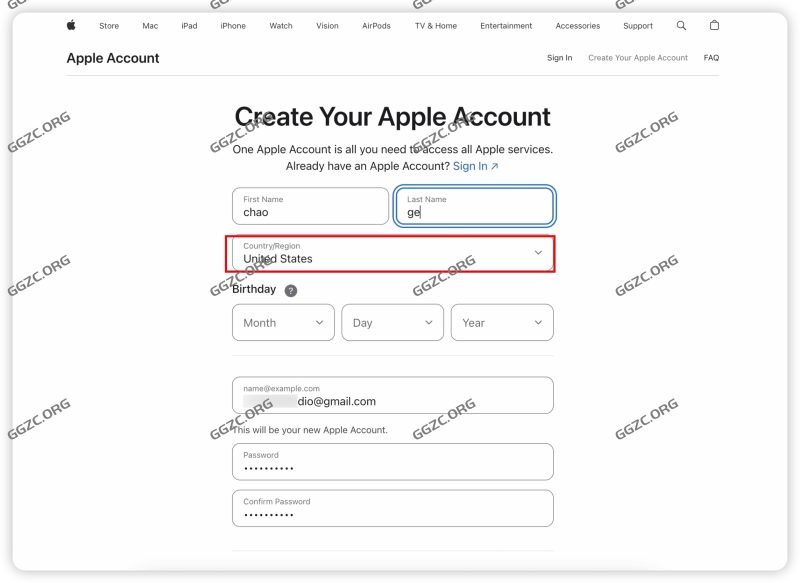
Today’s tutorial will use the web registration method as an example. Let’s begin the formal registration process. First, visit the Apple Developer website at https://developer.apple.com/. You’ll need to register an Apple account (Apple ID), as shown below. Fill in your name, country, date of birth, email address, password, and phone number, and then enter the verification code, as shown below.
![图片[1] - 2025 Latest Version of US Apple Developer Registration Tutorial, Web-Based Apple Developer Company Account Creation Tutorial - GGZC](https://ggzc.org/wp-content/uploads/2025/07/iShot_2025-07-30_22.57.25-1024x747.jpg)
When the registration is normal, enter the email verification code sending stage, as shown below.
![图片[2] - 2025 Latest Version of US Apple Developer Registration Tutorial, Web-Based Apple Developer Company Account Creation Tutorial - GGZC](https://ggzc.org/wp-content/uploads/2025/07/iShot_2025-07-30_22.58.01-1024x699.jpg)
After the email verification code is passed, enter the mobile phone verification code stage. If there is no problem, the Apple account registration is completed.
![图片[3] - 2025 Latest Version of US Apple Developer Registration Tutorial, Web-Based Apple Developer Company Account Creation Tutorial - GGZC](https://ggzc.org/wp-content/uploads/2025/07/iShot_2025-07-30_22.58.29-1024x706.jpg)
Click the Account menu in the upper right corner of the developer website to enter the developer account registration page, as shown below.
![图片[4] - 2025 Latest Version of US Apple Developer Registration Tutorial, Web-Based Apple Developer Company Account Creation Tutorial - GGZC](https://ggzc.org/wp-content/uploads/2025/07/iShot_2025-07-30_23.06.02-1024x500.jpg)
To register as an Apple developer, you must first accept Apple’s agreement, as shown below.
![图片[5] - 2025 Latest Version of US Apple Developer Registration Tutorial, Web-Based Apple Developer Company Account Creation Tutorial - GGZC](https://ggzc.org/wp-content/uploads/2025/07/iShot_2025-07-30_23.07.18-1024x676.jpg)
If there are prompts as shown in the figure below, just follow the corresponding marks.
![图片[6] - 2025 Latest Version of US Apple Developer Registration Tutorial, Web-Based Apple Developer Company Account Creation Tutorial - GGZC](https://ggzc.org/wp-content/uploads/2025/07/iShot_2025-07-30_23.09.39-1024x636.jpg)
Now we will actually enter the registration process, click the blue Enroll today, as shown below
![图片[7] - 2025 Latest Version of US Apple Developer Registration Tutorial, Web-Based Apple Developer Company Account Creation Tutorial - GGZC](https://ggzc.org/wp-content/uploads/2025/07/iShot_2025-07-30_23.11.08-1024x651.jpg)
In this step, we still recommend using the app software to register for Apple’s system. We still click [Continue enrollment of the web]
![图片[8] - 2025 Latest Version of US Apple Developer Registration Tutorial, Web-Based Apple Developer Company Account Creation Tutorial - GGZC](https://ggzc.org/wp-content/uploads/2025/07/iShot_2025-07-30_23.13.56-1024x601.jpg)
In this step, we begin to complete the Apple developer registrant information and enter the corresponding name and address contact information according to the prompts, as shown below.
![图片[9] - 2025 Latest Version of US Apple Developer Registration Tutorial, Web-Based Apple Developer Company Account Creation Tutorial - GGZC](https://ggzc.org/wp-content/uploads/2025/07/iShot_2025-07-30_23.15.19-1024x722.jpg)
After verifying that the information is correct, confirm the next step.
![图片[10] - 2025 Latest Version of US Apple Developer Registration Tutorial, Web-Based Apple Developer Company Account Creation Tutorial - GGZC](https://ggzc.org/wp-content/uploads/2025/07/iShot_2025-07-30_23.16.43-1024x747.jpg)
Then select the registration type of the developer account, we select the second option, company or organization identity.
![图片[11] - 2025 Latest Version of US Apple Developer Registration Tutorial, Web-Based Apple Developer Company Account Creation Tutorial - GGZC](https://ggzc.org/wp-content/uploads/2025/07/iShot_2025-07-30_23.17.24-1024x695.jpg)
Follow the system prompts and enter the corresponding U.S. company name and D-U-N-S ® Number, as shown below.
![图片[12] - 2025 Latest Version of US Apple Developer Registration Tutorial, Web-Based Apple Developer Company Account Creation Tutorial - GGZC](https://ggzc.org/wp-content/uploads/2025/07/iShot_2025-07-30_23.18.14-1024x757.jpg)
As shown in the figure below, the Apple system automatically extracts company address information based on the D-U-N-S ® Number.
![图片[13] - 2025 Latest Version of US Apple Developer Registration Tutorial, Web-Based Apple Developer Company Account Creation Tutorial - GGZC](https://ggzc.org/wp-content/uploads/2025/07/iShot_2025-07-31_15.02.00-1024x648.jpg)
Then, follow the prompts to enter the organization’s valid official website, organization phone number, select the authorizer type, and set the organization’s contact email address, as shown below
![图片[14] - 2025 Latest Version of US Apple Developer Registration Tutorial, Web-Based Apple Developer Company Account Creation Tutorial - GGZC](https://ggzc.org/wp-content/uploads/2025/07/iShot_2025-07-31_15.05.35-1024x669.jpg)
The developer registration information has been submitted for review. If everything is correct, you will proceed to the next step, which is to pay $99. In some cases, additional verificatiom may be required or the review may be put on hold.
![图片[15] - 2025 Latest Version of US Apple Developer Registration Tutorial, Web-Based Apple Developer Company Account Creation Tutorial - GGZC](https://ggzc.org/wp-content/uploads/2025/07/iShot_2025-07-31_15.10.33-1024x647.jpg)
For example, when registering as a Hong Kong company developer, the following information must be supplemented. Of course, company developer registrations in most countries may require similar information to be supplemented for verification, as shown in the figure below.
![图片[16] - 2025 Latest Version of US Apple Developer Registration Tutorial, Web-Based Apple Developer Company Account Creation Tutorial - GGZC](https://ggzc.org/wp-content/uploads/2025/07/iShot_2025-07-31_15.14.09-1024x664.jpg)
After the entire developer registration process has been reviewed and confirmed, the payment process can begin. As shown below
![图片[17] - 2025 Latest Version of US Apple Developer Registration Tutorial, Web-Based Apple Developer Company Account Creation Tutorial - GGZC](https://ggzc.org/wp-content/uploads/2025/07/iShot_2025-07-31_15.17.19-1024x526.jpg)
This is the final step in developer registration: set your payment method and make the payment. Currently, the web registration version only accepts bank and credit cards. Cards must be US-based. Since 2019, Apple has implemented risk control blocking during the $99 payment or renewal process. Therefore, if you’re unlucky, your payment may fail.
![图片[18] - 2025 Latest Version of US Apple Developer Registration Tutorial, Web-Based Apple Developer Company Account Creation Tutorial - GGZC](https://ggzc.org/wp-content/uploads/2025/07/iShot_2025-07-31_15.19.21-1024x551.jpg)
If your bank card isn’t supported or encounters a risk control block, a situation similar to the one shown below will appear.
Such payment issues will become particularly severe after 2025. For some developers, the biggest headache of online registration is payment issues.
![图片[19] - 2025 Latest Version of US Apple Developer Registration Tutorial, Web-Based Apple Developer Company Account Creation Tutorial - GGZC](https://ggzc.org/wp-content/uploads/2025/07/iShot_2025-07-31_15.21.48-1024x550.jpg)
After successfully paying $99, you’ll need to wait 5-48 hours for final confirmation.
Only then can you access the developer dashboard to publish your app and submit it for review. In some cases, even if you successfully pay $99, your payment may still be automatically refunded, and subsequent registration may fail.


No comments yet